Tuesday, May 23, 2006


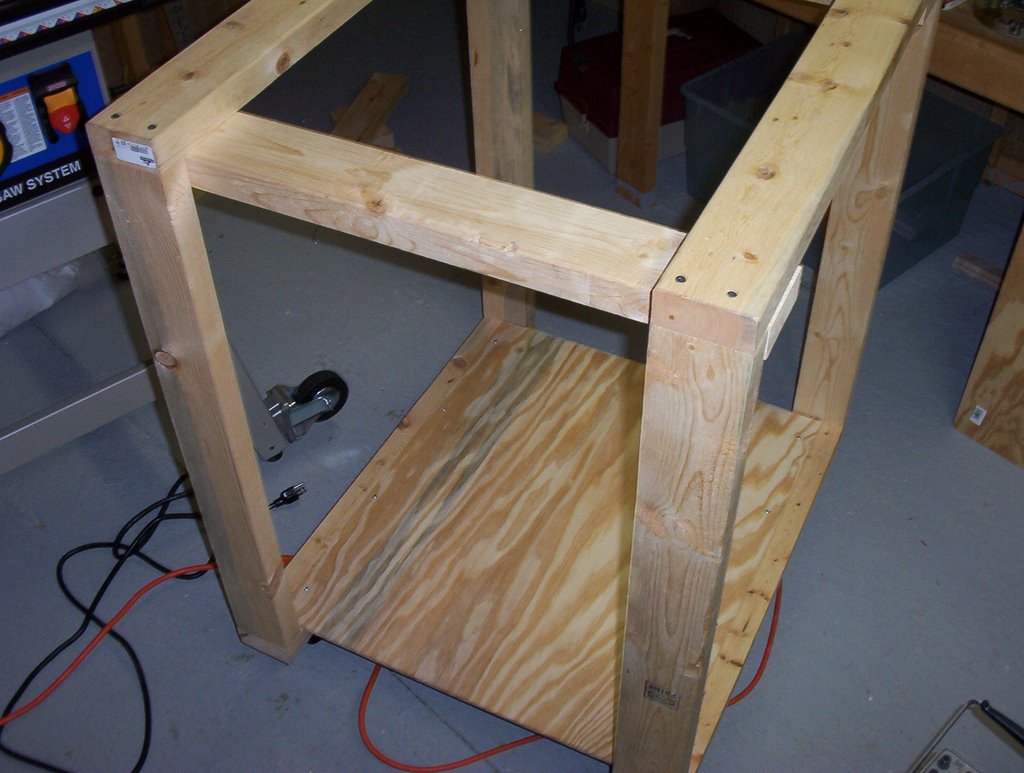
I've made some real progress on the arcade over the past week. I finished up most of the internals of the arcade in my sketchup drawing (at least enough to start on building the thing). I got most of the wood and hardware that was needed (except for the big 4'x8' sheets of plywood for the sides). I also got started on the internal framework. So now I've got a roughly 3'x3' frame of 2x4s with a platform and casters on the bottom. To this frame I'll be attaching the control panel, the platform for the TV, and eventually the sides of the cabinet. This weekend I'm going to be out of town, but the weekend after that I'll be working on putting together the control panel.

Tuesday, May 02, 2006


I did a bit more work on the arcade plans. I still need to do a bit more, such as adding dimensions, implementing the internal parts of the cabinet, and making some modifications like making the cabinet taller, but it's looking pretty good so far. Above is a screenshot of what I've got at the moment.

Monday, May 01, 2006

So Google has done it again: They've bought a company that makes 3D modeling software called Sketchup. I'm no expert in the field of 3D modeling software but I've tried out a few products here and there, and this one is head and shoulders above the rest. It is some of the most intuitive software I've ever used. By and large, things just work the way you think they would. There are very few tools to learn because the tools that are there can mostly do anything you need. It seems like in Sketchup you can build something in minutes that would take hours or days to do in traditional modeling software. Sketchup used to cost $500, but Google has now put out a slightly crippled FREE version (you can't export to other 3D file formats and you don't have the tools to make 3D contour maps). It's becoming obvious that one of the real strongpoints of Sketchup is the ease with which you can explore design alternatives; you can try things out quickly and easily, and see how they look (what if this part was longer, what if this piece was inset further, what if I make this side smaller, etc).

I've decided to use it to draw up the plans for the arcade. I'm almost done with the drawing already (I put in a couple of hours this weekend). I think in the future I'm going to use this to model my woodworking projects as well. It's just so easy.

BTW, in addition to working on the 3D model of the arcade I made a full size layout of the control panel (unfortunately, using boring pencil and paper).

Monday, April 17, 2006

OK, so I finally got the spinner working with the ME4. I first tried replacing the active low optical board on the spinner with a homemade active high board. This appeared to work great but for some reason the ME4 wouldn't read the signals correctly. Basically the mouse would jump back and forth rapidly instead of moving in one direction. This would lead me to believe the signals weren't actually quadrature, but after looking at them with an o-scope they certainly looked quadrature. So at this point I was somewhat disapointed and so I went back to the pullup resistor idea. This time I used two variable resistors as pullups. Once again at 1Kohm the ME4 was not reading the signals, but I turned up both resistors and at about 1.8K the ME4 started responding. Now on to control panel construction...

Thursday, April 13, 2006

I've now had a chance to try out the ideas Hagstrom sent me (see the 4/10 post) for getting my Tornado spinner working with the ME4. They didn't work. At least now the voltage on the spinner sensor lines is changing but the levels are all wrong (the low level is about 2.2V and the high is about 3.5V). So I wrote Hagstrom back and they suggested that I increase the value of my pullup resistors from the 1K they suggested. I think this may work, but it might be simpler to just build an active high optical encoder board for the Tornado. I've already got all the parts (two optical interruptor sensors, a resistor, and a 4 contact 0.1" header) I need to do it and the circuit is pretty simple; then I won't have to worry so much about resistor values and voltage levels.

Incidentally, I hooked up one axis of my trackball to the spinner input on the ME4 and it worked fine. So at least the spinner channel isn't fried or anything.

UPDATE: I breadboarded the active high optical encoder circuit last night and it seems to be working. Now I just have to solder it onto some perf board and mount the board to the spinner. I'll probably post some pics of the finished product and the circuit schematic after I have it done.

Monday, April 10, 2006

I started officially working on the arcade project this weekend. I started by hooking up my Happ Controls trackball to a Hagstrom Electronics ME4. The ME4 basically just makes a trackball (and optionally a spinner) look like a mouse to your PC. So the trackball went off without a hitch, but then I tried to hook up my SlikStik Tornado spinner and that did not work. So I spent some time debugging (hooked up the spinner to a breadboard to make sure that it was working, etc.). It turned out that the spinner is active low (meaning the signal lines need to be pulled UP to 5V) and the ME4 expects an active high signal (meaning it is pulling the signals DOWN to ground via some 2.2K resistors). So I emailed Hagstrom Electronics at 11PM and the next morning before 9AM they had replied and said I was indeed correct and I needed to pull up the signal lines to 5V using a 1K resistor. I'm pretty impressed with their customer service. Nice job Hagstrom. I think I'll test out the fix tonight.

Thursday, April 06, 2006

I bought a Ryobi BT3100 table saw from HomeDepot not too long ago. I found out about it from Make magazine, and then checked out the fanpage. It seemed like a pretty good tradeoff between price and features/precision. So far I've been pretty happy with it. I've now started watching The New Yankee Workshop obsessively. I think pretty soon I'm going to buy a router, since the saw already includes an accessory table that allows a router to mount underneath. So now I'll have a table saw and a router table. Now I just have to figure out what to make with it...
UPDATE: I just got a Ryobi router (RE180PL) too. Purists would make fun of me for not getting a Porter Cable, but since I'm only a weekend warrior in this hobby and I'm not making 30 cuts a day I went with the Ryobi because it was half as much and it easily mounts to my table saw. So there.

Wednesday, April 05, 2006

Recently I got a 27" TV from a guy off of craigslist, with the intention of using it for my arcade project. So here's the thing: I looked at TVs at the big stores like Best Buy and Fry's and 1) they're expensive and 2) all the current designs have speakers attached to the sides of the TV which make it too big to fit in my arcade enclosure. So I started looking for older TVs on craigslist, and I found one that was only $25 because the sound didn't work (the picture is fine). The guy lived down on Town Lake in downtown Austin, and he was cool as hell. He was definitely a hippy and he even said "Peace, man" as his parting comment to me. What can I say, you gotta love hippies (and Austin too for that matter since the two are inextricably linked).

So my next big project is a stand-up arcade. It's going to be your typical one with a PC running MAME plus some other emulators (NES, SNES, GB, GBA, Genesis, etc.). I think I'm going to use GameEx as the front end for it. My inspiration for it comes from two arcade projects: The Supercade and Jubei. Basically, I want the natural wood look of Jubei, and the 2-tiered control layout of Supercade (although I'm going to make the 2nd tier detachable so I can create modular control panels for positional guns and steering wheels). The only thing that's unique about my design is that it's going to be the most complete arcade that I've seen yet: it'll have joysticks and buttons for 4 players, a Tornado spinner, a trackball, a 4-way joystick, two light guns, ports for attaching 4 PSX and N64 controllers, a flightstick, and in the future I should be able to add expansions for positional guns and steering wheels. So it's going to be the cadillac of arcades.

Monday, April 03, 2006

It's been quite some time since I've posted. I guess getting married and buying a house will do that to you. So I'm going to try and start posting more now. I've been busy in my spare time, so I'll be posting more info about what I've been up to over the next week or two.

Tuesday, July 26, 2005

I had a hard drive crash last Sunday in my media PC (or HTPC, PVR, or whatever the hell you want to call it). Anyway it's the PC I wrote about building in Make magazine (see my profile for a link to it).

It's my pride and joy and it really bums me out that it is down. Since I also run my FTP, HTTP, SSH, and streaming mp3 servers off of that machine it definitely cramps my style. Plus I can't watch any of my recorded TV shows and since I use that machine to play DVDs I can't watch those anymore either. You never realize how much you'll miss something until it's gone.

On the other hand it was probably partially my own fault that it failed (although it DOES seem as if every hard drive crash I have experienced is at the hands of a Maxtor hard drive; note to self: don't buy those anymore). I do have far too little ventilation in the PC's case so the drives get pretty warm. Hopefully I can fix that.

I'm still in the process of replacing the drive and getting everything installed again. So I'm going to use this time as an excuse to do some upgrades that I've been meaning to do for some time:

1) Install WinXP instead of Win2K. It's really hard to justify doing this when the machine is running beautifully with Win2K, but now that I'm reinstalling everything anyway I might as well upgrade. I had a copy of WinXP Pro on an old PC that I haven't used in a couple of years so I just transferred that copy to the media PC.
2) Improve the ventilation in the case. As said before, the drives get pretty warm in there so I'd like to improve that a bit. I thought I was going to have to buy some fans and figure out how to rig them in my already-tight case, but after examining things a bit I figured out a way I could move the drives around to drastically improve airflow so I shouldn't even need fans now. Woohoo!
3) Replace the power supply. I was using a stock Dell power supply (250W) that was woefully under-powered since I had a Pentium 4, a Geforce 3, 2 TV tuner cards, 3 hard drives, and a DVD drive. Frankly, I'm amazed the power supply was able to power all that stuff at all. It did get pretty hot when I was doing much drive access on the machine... So anyway, I went ahead and threw out a little cash for a good power supply. I got an Antec SmartPower 2.0 500W supply from my local Fry's. It was pricey but it should be reliable. To install it I had to actually cut away part of the metal on the back of the case to get it to fit correctly. Man, the Dremel I bought years ago has turned out to be one of the best investments I've made.
4) Buy a copy of Norton Ghost 9.0, so I can image the drive so if this ever happens again I can just replace the hard drive and throw the image on the new drive. I already backup my data files onto a USB external hard drive but for some reason it didn't occur to me how much of a pain in the ass it would be to reinstall all the programs and OS. I'll also be able to use this to image my main PC's drive so I can upgrade it from the always-full 40GB drive it currently has to a larger 160GB or 200GB drive.
5) I recently got a really good deal on a Hauppage PVR-150 at Circuit City. I was a little worried about installing it with my old power supply (I figured it might be the straw that broke the camel's back). But now that I've got a new power supply I'm gonna throw the new card in there. Now I'll be able to record 2 shows in BeyondTV at the same time!

Well this experience has sucked, but I'll probably have a much better machine when I'm all done.
Tuesday, July 19, 2005

Here's another cool find: Airscooter

Check out the Airscooter II, it looks like a personal helicopter for roughly the cost of an SUV.

There's no firm release date yet (some time in 2005), but it looks impressive so far.

If this thing became popular they'd have to re-write alot of laws, I think. Just think of a sky full of these things. They'd probably have to change the rules on unlicensed flying to exclude this thing. They might even have to come up with a completely different system of air traffic control...

Friday, July 15, 2005

So a while back I found this really cool compiler called SDCC. It is an open-source C compiler for several different microcontrollers (including the Microchip PIC, one of my personal favorites).

Anyway they just made a new release a little while ago, which is good. But it is difficult to get it up and running for PIC processors on Windows. So I put together the steps I had to go through to get it up and running on a Windows machine using Cygwin. This needs to be fleshed out and made a bit clearer, but at least I've got something...

-install gputils and Cygwin. Make sure to install "make" with your Cygwin install.

-download win32 version of sdcc and main (uncompiled) version of sdcc

-unzip main version of sdcc to a temp location and copy all files and folders to SDCC install directory

-must make these makefile changes to prevent gputils from segfault'ing
device\lib\pic16\debug\Makefile...
gplib -c $(LIB) gstack\\*.o

device\lib\pic16\libc\Makefile...
LOBJS = $(patsubst %,%\\*.o,$(DIRS))

device\lib\pic16\libsdcc\Makefile...
LOBJS = $(patsubst %,%\\*.o,$(DIRS))


-also must change "Makefile.in" to "Makefile" in
SDCC\device\lib
SDCC\device\include

-Script to create headers from inc files: 1) must have gptuils folder in C:\ 2) must have this script and inc2h.pl installed in sdcc root directory
#!/bin/bash

for file in $(ls /cygdrive/c/gputils/header/p*.inc)
do
export picstring=$(echo $file | sed "s/\/cygdrive\/c\/gputils\/header\/p//; s/.inc//")
../../inc2h.pl $picstring /cygdrive/c/gputils "pic$picstring.h"
done

Wednesday, July 13, 2005

Every once in a while I find something that totally surprises me. Today I found something new in the world of emulation. I've been a follower of console and handheld emulation for some time now (Super Nintendo, Gameboy, etc.). But I never thought about emulating those cheap little handheld games from way back in the day.

Well someone did think of it and they created a program to emulate these classic games. It's called LEDhead.

It looks pretty cool, and it runs on PocketPC and PalmOS to boot!

The only way I can think of to improve on this is to start emulating some of those little crappy LCD (not LED, but the ones with the custom game-specific LCD screens) games that they sold when I was a kid. That would be cool! Then I could recapture nearly all of my youth digitally.

Friday, July 08, 2005

I'm entering the 21st century finally. I decided to create a website about myself and some of the things I work on in my spare time (most of which are pretty geeky). I decided to use it also as a learning tool to teach myself HTML, website design, and also find out what blogging is all about.

My website is coming along but it's not quite ready for primetime, so all you get for now is this blog.

I'm not sure what I'm going to write here. Most of it will probably just be my random ravings (which will probably make me appear to be afflicted with attention deficit disorder).